
Find your MyChartLog in with Epic ID
  • Explore
  • News
  • Share My Story
  • About
  • Help
    Find your MyChart
    Log in with Epic ID
    Explore
    News
    Share My Story
    About
    Help
Help
Billing and payments

How do I sign up for paperless billing communications?

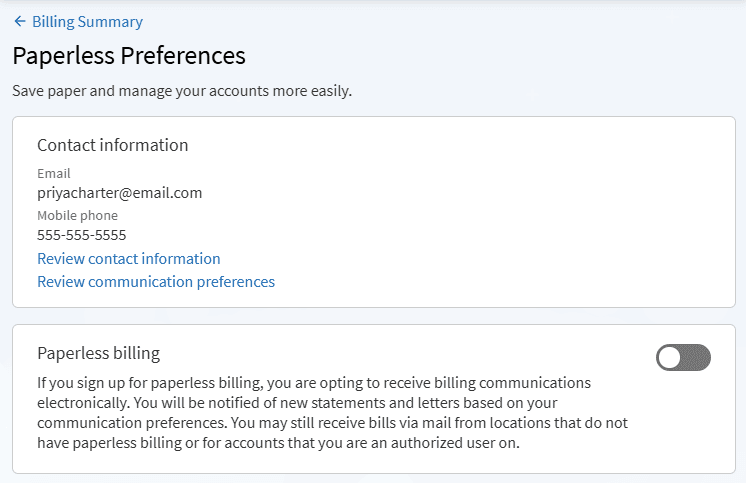
  1. From the home page or the Billing Summary page, select the Get started button on the paperless billing banner. If you do not see a banner, search for the Paperless Preferences activity.
  2. In the Contact information card, verify that the information displayed is accurate. If you have no contact information on file, select the Review contact information link to enter your information.
  3. You can choose to go paperless for your billing documents and for your explanation of benefits documents. Select the toggle button within the corresponding card to receive paperless documents. When it is green and shows a checkmark, you are opting to receive those documents electronically.
  4. Select Save changes.  

Related Questions

How do I pay a bill in MyChart?

Go to Billing Summary in MyChart to view your outstanding balance and make a payment with a credit card or bank account. You can also view past statements and billing details.

How do I sign up for automatic payments?

Sign up for Visit Auto Pay during eCheck-In or in-person check-in to automatically pay up to a set amount for your visit. You receive a notification before your payment method is charged.

MyChart is Epic

MyChart licensed from Epic Systems Corporation © 1999–2026

Engage

  • Find your MyChart
  • Explore
  • News
  • Share my story

Learn more

  • About
  • Help
  • Privacy policy
  • Patient registry
  • Community training hub

Download the app

Download on the App Store
Get it on Google Play