
Find your MyChartLog in with Epic ID
  • Explore
  • News
  • Share My Story
  • About
  • Help
    Find your MyChart
    Log in with Epic ID
    Explore
    News
    Share My Story
    About
    Help
Help
Have a video visit with your provider

How do I join the next available video visit?

If you need to be seen right away, you can join the queue for an on-demand video visit.
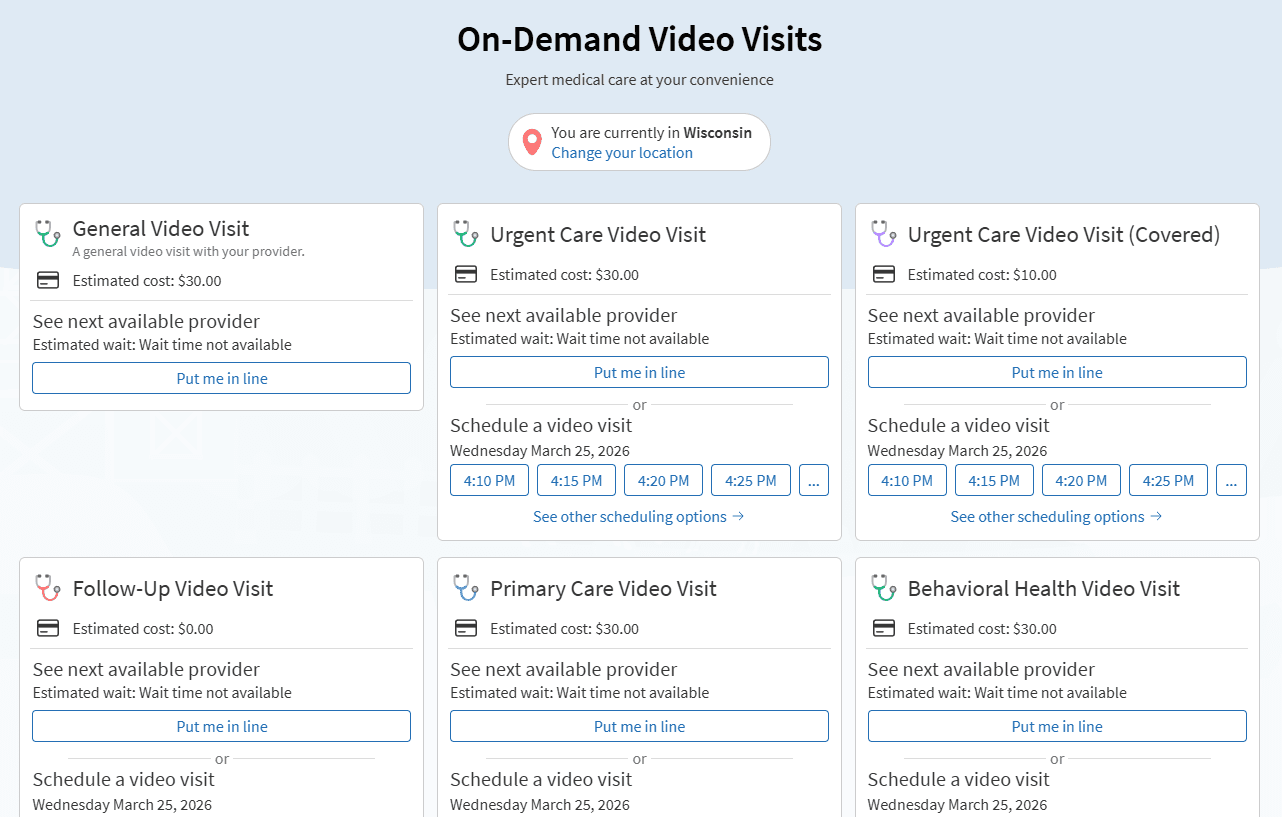
  1. From the menu in MyChart, search Talk to a Doctor or On-Demand Video Visits.
  2. Confirm the state you're currently in. Your device might request access to location services. 
  3. Select your reason for visit from the list of options. 
  4. After you've provided this information, select Put me in Line to be seen by the next available provider. You can choose to receive a notification when your provider is ready to see you.

Related Questions

How do I schedule an appointment in MyChart?

Go to Find Care and select Schedule an Appointment in MyChart to schedule or request an appointment with your provider. Depending on the appointment type, you might schedule it yourself or request a callback.

How do I prepare for my video visit?

Make sure your camera and microphone work and test your connection in MyChart at least 30 minutes before your video visit start time.

MyChart is Epic

MyChart licensed from Epic Systems Corporation © 1999–2026

Engage

  • Find your MyChart
  • Explore
  • News
  • Share my story

Learn more

  • About
  • Help
  • Privacy policy
  • Patient registry
  • Community training hub

Download the app

Download on the App Store
Get it on Google Play